Google Analytics
The widgets can send player interaction events to Google Analytics 4 through Google Tag Manager.
The widgets push gmz_engage_* events to window.dataLayer. A GTM container on the page is what forwards those events into GA4. This page covers how tracking is enabled and which events you will see.
Setup
Set gtm_container_id on the widgets configuration in Admin (a GTM container ID, for example GTM-XXXX). It is not a field on the JavaScript GamanzaEngageClient.init object.
In Admin, open Widgets Configuration → General and set Google Tag Manager Container ID:
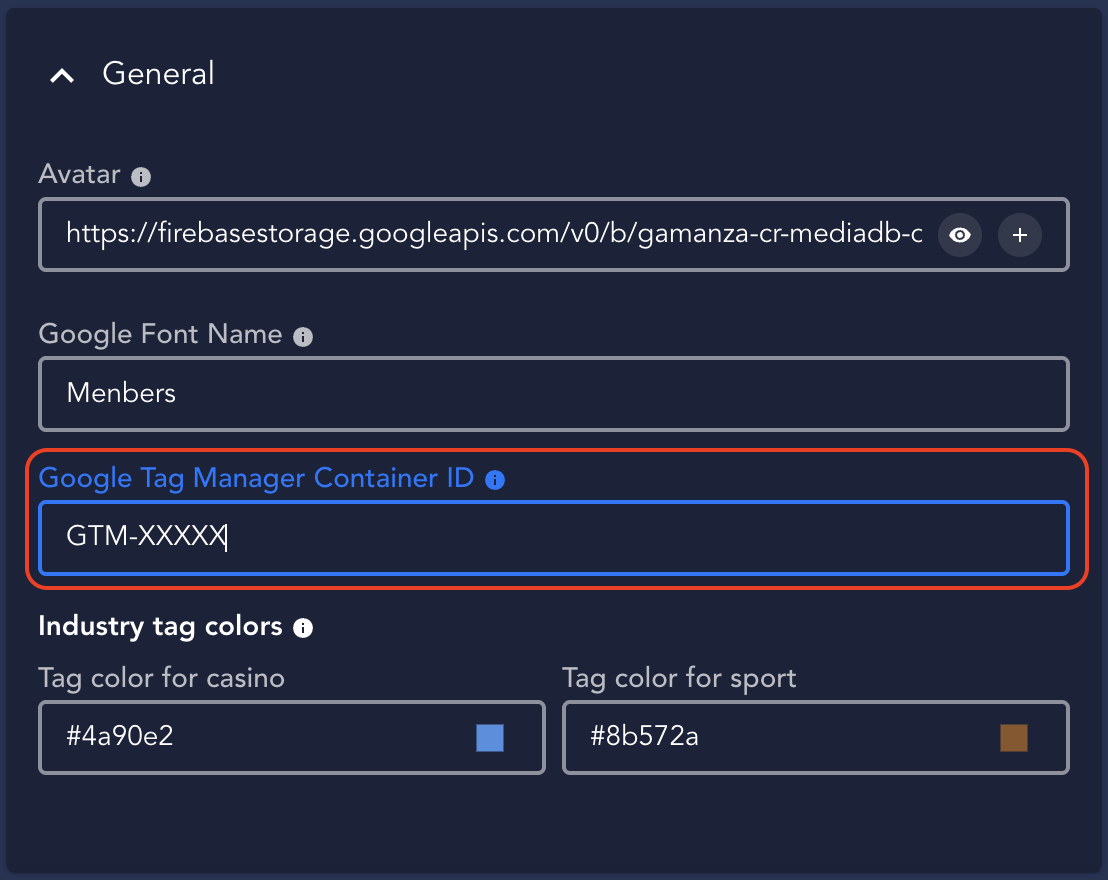
After the player session and settings load, if that ID is present, the widgets initialize that GTM container and push events to dataLayer.
The host page may already have its own GTM container. Engage uses the shared dataLayer, so that existing container can also see gmz_engage_* events. The gmz_engage_ prefix keeps them distinct from other tags. Setting gtm_container_id adds the Engage container; it does not replace the host container.
If gtm_container_id is empty, the widgets do not load a GTM container. They still push events to dataLayer. Those pushes reach Google Analytics only if another container on the page (for example the casino's GTM) listens for them.
A Gamanza Engage GTM container template already includes tags, triggers, and variables for these events (see Notes). If you configure GTM yourself, create Custom Event triggers whose Event Name matches the gmz_engage_* names in the catalog below (the dataLayer event value), and map those triggers to GA4 Event tags.
window.dataLayer.push({
  event: 'gmz_engage_sidebar_nav_click',
  sidebar_menu_item: 'missions',
  device_type: 'desktop',
  player_id: 'player-id',
  player_genre: 'male',
})
Shared parameters
Every event includes:
| Parameter | Values |
|---|---|
device_type | mobile, tablet, or desktop |
player_id | Engage player ID (gmzPlayerId) |
player_genre | Player gender, or an empty string when it is not available |
GTM keeps previous dataLayer keys unless they are cleared. Before each push, the widgets reset sticky identifiers (tournament_id, loot_airdrop_id, mission_bundle_id, notification_id, notification_type, optin_type, optin_amount, tab_content, widget_location) so a later event does not reuse values from an earlier one.
View events fire once per page path. Rapid duplicate clicks with the same name, path, and payload are ignored for two seconds.
Widget views
A rendered widget emits gmz_engage_widget_view. Use widget_type to tell the widgets apart. One GTM Custom Event trigger on gmz_engage_widget_view covers every widget.
widget_type | When it fires |
|---|---|
avatar | Avatar widget renders |
badge-level | Level badge widget renders |
points | Points widget renders |
tokens | Tokens widget renders |
reward-shop | Reward Shop widget renders |
my-boosters | My Boosters widget renders |
my-rewards | My Rewards widget renders |
active-boosters | Active Boosters widget renders |
gamification-mechanics | Mechanics widget renders |
notifications | Notifications widget renders |
missions | Missions page widget renders |
tournaments | Tournaments page widget renders |
loot-airdrops | Loot Airdrops page widget renders |
rank-downgrade-minimum-activity | Rank downgrade widget renders |
rich-inbox-icon | Rich Inbox icon widget renders |
rich-inbox-page | Rich Inbox page widget renders |
sidebar | Sidebar becomes visible (not on first mount) |
Gamification Data widgets set widget_type to gamification-data plus data-gamification-type (rank, level, token, or xp): gamification-data-rank, gamification-data-level, gamification-data-token, gamification-data-xp.
Rich Inbox also emits gmz_engage_inbox_open (see Rich Inbox). That is the interaction event to use for opens; gmz_engage_widget_view still fires when those containers render.
Event catalog
Extra parameters below are in addition to the shared parameters.
widget_location identifies the surface. Values you will see:
- Widget
data-type:sidebar,reward-shop,missions,tournaments,loot-airdrops,active-boosters,my-rewards,notifications,rich-inbox-icon,rich-inbox-page - Sidebar home:
sidebar | home - Sidebar home with context:
sidebar | home | active missions,sidebar | home | my rewards,sidebar | home | loot airdrops - List context:
sidebar | active,sidebar | history,missions | active,missions | history,tournaments | active,tournaments | history,loot-airdrops | active,loot-airdrops | history - Optional suffix after the list context:
mission bundle,mission details,details,banner,tournament card,loot airdrop card - My Rewards (shop tab):
reward-shop | my rewards - Snackbar:
snackbar
Initialization
| Event name | Extra parameters | When it fires |
|---|---|---|
gmz_engage_widgets_initialized | — | Widgets finished loading player data and global settings |
Shared reward events
These events are used from the sidebar, missions, tournaments, loot airdrops, notifications, and My Rewards. Use widget_location (and mission_id / tournament_id / loot_airdrop_id when present) to tell the surfaces apart.
| Event name | Extra parameters | When it fires |
|---|---|---|
gmz_engage_reward_click | reward_id, reward_type, widget_location; optionally mission_id, mission_bundle_id, tournament_id, loot_airdrop_id | Player opens a reward chest / claim dialog |
gmz_engage_reward_modal_claim_click | reward_id, reward_type, widget_location | Player confirms claim in the reward modal |
gmz_engage_reward_modal_dismiss_click | reward_id, reward_type, widget_location | Player closes the reward modal without claiming |
Sidebar
| Event name | Extra parameters | When it fires |
|---|---|---|
gmz_engage_sidebar_status | sidebar_status (open or close) | Sidebar opens or closes |
gmz_engage_sidebar_nav_click | sidebar_menu_item (home, missions, tournaments, reward_shop, loot_airdrops) | Player selects a sidebar menu item |
gmz_engage_mb_detail_click | mission_bundle_id, widget_location | Player opens a mission bundle from the sidebar |
gmz_engage_tnmt_detail_open | tournament_id, widget_location | Player opens a tournament from the sidebar (home, list, or priority item) |
gmz_engage_loot_detail_open | loot_airdrop_id, widget_location | Player opens a loot airdrop from the sidebar (home, list, or priority item) |
gmz_engage_mb_history_click | widget_location | Player opens mission history from the sidebar |
gmz_engage_tnmt_history_click | widget_location | Player opens tournament history from the sidebar |
gmz_engage_loot_history_click | widget_location | Player opens loot airdrop history from the sidebar |
gmz_engage_reward_item_detail_click | item_id, item_category, cost, widget_location | Player opens a shop item from the sidebar |
gmz_engage_reward_cat_click | category_name, widget_location | Player selects a shop category in the sidebar |
gmz_engage_reward_purchase_confirm_click | item_id, item_category, cost, quantity, widget_location | Player confirms a purchase from the sidebar |
Opt-in, games, reward claim, and booster events from the sidebar use the shared events in Opt-in, Games, Shared reward events, and Boosters.
Missions
| Event name | Extra parameters | When it fires |
|---|---|---|
gmz_engage_mb_detail_expand_click | mission_bundle_id | Player expands a mission bundle on the missions page |
gmz_engage_mb_detail_collapse_click | mission_bundle_id | Player collapses a mission bundle on the missions page |
gmz_engage_mission_detail_open | mission_id, mission_bundle_id, widget_location | Player opens a mission detail dialog |
gmz_engage_mb_history_click | widget_location | Player opens the missions history tab |
Tournaments
| Event name | Extra parameters | When it fires |
|---|---|---|
gmz_engage_tnmt_detail_open | tournament_id, widget_location | Player opens a tournament detail |
gmz_engage_tnmt_detail_expand_click | tournament_id | Player expands a tournament on the tournaments page |
gmz_engage_tnmt_detail_collapse_click | tournament_id | Player collapses a tournament on the tournaments page |
gmz_engage_tnmt_rewards_click | tournament_id, widget_location | Player opens the tournament rewards tab |
gmz_engage_tnmt_history_click | widget_location | Player opens the tournaments history tab |
Loot airdrops
| Event name | Extra parameters | When it fires |
|---|---|---|
gmz_engage_loot_detail_open | loot_airdrop_id, widget_location | Player opens a loot airdrop detail |
gmz_engage_loot_detail_expand_click | loot_airdrop_id | Player expands a loot airdrop on the page |
gmz_engage_loot_detail_collapse_click | loot_airdrop_id | Player collapses a loot airdrop on the page |
gmz_engage_loot_details_tab_click | loot_airdrop_id, widget_location, tab_content (winners, rewards, or the tab id) | Player switches a loot airdrop details tab |
gmz_engage_loot_history_click | widget_location | Player opens the loot airdrops history tab |
Reward shop
| Event name | Extra parameters | When it fires |
|---|---|---|
gmz_engage_reward_shop_content_view | reward_shop_content (rewardShop, myRewards, or history) | Player opens a Reward Shop tab (shop, My Rewards, or history) |
gmz_engage_reward_item_detail_click | item_id, item_category, cost, widget_location | Player opens an item detail |
gmz_engage_reward_purchase_confirm_click | item_id, item_category, cost, quantity, widget_location | Player confirms a purchase |
gmz_engage_reward_cat_click | category_name, widget_location | Player opens a category |
gmz_engage_reward_cat_collapse_click | category_name | Player returns from a category to the shop list |
gmz_engage_reward_pagination_click | category_name, page_number, widget_location | Player changes page in the shop list |
gmz_engage_reward_hist_pagination_click | page_number | Player changes page in shop history |
gmz_engage_minigame_click | minigame_id, widget_location | Player launches a mini-game from My Rewards |
Notifications
| Event name | Extra parameters | When it fires |
|---|---|---|
gmz_engage_notif_view | notification_id, notification_type | A notification snackbar is shown |
gmz_engage_notif_expand_click | notification_id, notification_type | Player expands a notification |
gmz_engage_notif_dismiss_click | notification_id, notification_type | Player dismisses a notification (snackbar or modal) |
gmz_engage_notif_tnmt_detail_click | notification_id, notification_type, tournament_id | Player opens tournament details from a notification |
gmz_engage_notif_playnow_click | notification_id, notification_type, tournament_id | Player clicks Play now on a tournament-start notification |
gmz_engage_notif_seeresults_click | notification_id, notification_type, tournament_id | Player clicks See results on a tournament-end notification |
Boosters
| Event name | Extra parameters | When it fires |
|---|---|---|
gmz_engage_boost_open | widget_location | Player opens the My Boosters list |
gmz_engage_boost_activate_click | booster_id, booster_type, widget_location | Player starts activating a booster |
gmz_engage_boost_activate_confirm_click | booster_id, booster_type, widget_location | Player confirms booster activation |
gmz_engage_boost_activate_cancel_click | booster_id, booster_type, widget_location | Player cancels booster activation |
gmz_engage_active_booster_detail | booster_id, booster_type, booster_status (boolean), widget_location | Player opens (true) or closes (false) an active booster detail |
Mechanics
| Event name | Extra parameters | When it fires |
|---|---|---|
gmz_engage_mechanics_modal | mechanics_type (opt_in or opt_out), mechanics_status (open or close) | Player opens or closes the gamification opt-in / opt-out modal |
gmz_engage_mechanics_modal_confirm_click | mechanics_type (opt_in or opt_out) | Player confirms the opt-in or opt-out |
Rich Inbox
Every Rich Inbox event includes widget_location: rich-inbox-icon (header popover) or rich-inbox-page (full page).
| Event name | Extra parameters | When it fires |
|---|---|---|
gmz_engage_inbox_open | widget_location | Header popover opens, or the Rich Inbox page mounts |
gmz_engage_inbox_message_open | message_id, filter (all, unread, or favorites), widget_location | Player opens a message preview |
gmz_engage_inbox_preview_close_click | message_id, widget_location | Player closes the message preview |
gmz_engage_inbox_mark_as_read_click | message_id or messages_count, status (read or unread), widget_location | Player marks one message or a selection as read / unread |
gmz_engage_inbox_mark_as_favorite_click | message_id or messages_count, status (added or removed), widget_location | Player adds or removes a favorite (single or bulk) |
gmz_engage_inbox_mark_all_as_read_click | messages_count, status (read_all), widget_location | Player clicks Mark all as read. messages_count is the estimated unread count at click time |
gmz_engage_inbox_toggle_select_click | scope (single or all_visible), status (selected or unselected), message_id (single only), widget_location | Player selects or unselects messages |
gmz_engage_inbox_search_input | search_term (query length, not the text), status (search or clear), widget_location | Search runs (3+ characters) or is cleared |
gmz_engage_inbox_load_more_scroll | page_number, filter (all, unread, or favorites), widget_location | Infinite scroll loads the next page |
Opt-in
gmz_engage_optin_click is used for missions, tournaments, and loot airdrops (cards, details, and snackbar).
| Event name | Extra parameters | When it fires |
|---|---|---|
gmz_engage_optin_click | widget_location, optin_type (tokens or free); optin_amount when optin_type is tokens; plus mission_bundle_id, tournament_id, or loot_airdrop_id depending on the product | Player joins / opts in |
Games
gmz_engage_games_click is used when the player opens the games catalog from a tournament or loot airdrop.
| Event name | Extra parameters | When it fires |
|---|---|---|
gmz_engage_games_click | widget_location; plus tournament_id or loot_airdrop_id | Player opens the games dialog |
How to verify
- Confirm
gtm_container_idis set on the widgets configuration and that the widgets have finished initializing. - Open GTM Preview (Tag Assistant) on the host page and interact with a widget.
- In the browser console, inspect
window.dataLayerforgmz_engage_*events and their parameters. - In GA4, use DebugView / Realtime to confirm the matching events arrive.
Notes
A ready-to-use Google Tag Manager container is available as a template. It already includes the tags, triggers, and Data Layer variables for every gmz_engage_* event in this catalog.
You do not need to recreate that configuration. Import the template into your GTM workspace — or reuse it as the starting container — and bind the GA4 Event tags to your own Google Analytics 4 property.
Request the current template from your Customer Success Manager. After import:
- Set
gtm_container_idin Admin if the widgets should load that container. - If the host page already has GTM, import the template into that workspace instead. The widgets still push events to the shared
dataLayer.