Engage Integration MCP Server
The Engage Integration MCP Server connects your AI coding assistant to Gamanza Engage. Once it is configured, you can ask your assistant questions such as "which endpoints do I need for Loyalty?", "map my wager message to Engage" or "why did my last bet events fail on staging?" and get answers that come from our published API specs, our integration rules and your own staging instance, with a citation for every claim.
It uses the open Model Context Protocol (MCP), so it works with any MCP-capable tool: Cursor, Claude Code, VS Code with GitHub Copilot, JetBrains AI Assistant and Junie, Windsurf, Claude Desktop and others.
The MCP server is enabled per staging instance. To start using it, ask your Customer Success Manager (CSM) to enable it for your instance. There is no extra cost.
Create an OAuth client in the Admin Dashboard, then jump to Connect your IDE. Setup takes about five minutes.
Why use it
An integration with Gamanza Engage usually involves between 4 and 20+ endpoints, depending on the Product Suite you purchased. Most of the time is not spent writing HTTP calls; it is spent working out which endpoints apply, how your data maps onto ours and why a payload is rejected. The MCP server targets exactly those steps:
| Integration step | Without the MCP server | With the MCP server |
|---|---|---|
| Scope | Read the whole API reference to find what applies to your suite. | Ask once. Get the endpoints for your Product Suite, in dependency order, with the reason for each. |
| Map | Guess which Engage field matches stake, cur or ts, and in which unit and format. | Get the target endpoint and field for every PAMS field, with units, formats and known mistakes. |
| Validate | Send a request, read a 400, search the docs, try again. | Send a synthetic payload to your staging gateway and get each field error explained with a fix. |
| Debug | Copy requests out of logs and share them with our team. | Ask about the requests your code already sent to staging. The assistant reads them for you. |
| Ask a human | Write an email and wait. | Escalate from the IDE. The Integrations Manager and your CSM get the full question. |
Three properties make the answers trustworthy:
- Grounded. Answers come from the published specs and docs, plus a reviewed Semantic Mapping Layer. When there is no
grounded answer, the server says
no_grounded_mappinginstead of guessing a field. - Verifiable. Every response includes citations (spec, docs page or mapping rule) and the version of the knowledge it was built from.
- Always current. The server rebuilds its knowledge from docs.gamanzaengage.com automatically, so it never lags behind the documentation you read.
How it works
 Your IDE (Cursor, Claude Code, VS Code, JetBrains, ...)
   │  The AI assistant runs in your IDE and decides which tool to call
   │
   │  HTTPS  POST https://<your staging Platform API host>/mcp
   │  Headers x-client-id / x-client-secret  (your staging OAuth client)
   ▼
 Engage Integration MCP Server  (hosted by Gamanza, one per staging instance)
   ├─ Knowledge: published API specs + docs + knowledge base, refreshed automatically
   ├─ Semantic Mapping Layer: units, formats, aliases, sequencing rules, common mistakes
   ├─ Product Suite profiles: required / recommended / optional endpoints per suite
   │
   ├──► Your staging Platform API Gateway   (payload validation, with your own token)
   └──► Your staging HTTP Debugger feed     (the requests your integration sent)
- Your IDE's AI assistant decides that it needs Engage information and calls one of the seven
engage_*tools. - The MCP server authenticates the call with your staging OAuth client, exactly like the Platform API does.
- The tool answers from the knowledge corpus or calls your staging gateway on your behalf, with your own token.
- The assistant reads the structured result (with citations) and explains it to you, or uses it to write code.
The model is the one already in your IDE. The MCP server only supplies grounded facts and tools. It does not send your code or your conversation anywhere; it only sees the arguments of the tool calls your assistant makes.
Prerequisites
- A Gamanza Engage staging instance and its Platform API URL. Your CSM shares it during onboarding (see Integration Process).
- Access to the staging Admin Dashboard, to create OAuth client credentials.
- An MCP-capable tool. Any of these works: Cursor, Claude Code, VS Code 1.102+ with GitHub Copilot, JetBrains IDEs with AI Assistant or Junie, Windsurf, Claude Desktop.
- For the bridge option only (older clients, Claude Desktop): Node.js 18 or later, so
npxis available.
Step 1: Create a dedicated OAuth client
The MCP server reuses the OAuth client credentials you already know from the Platform API. There is no new credential type.
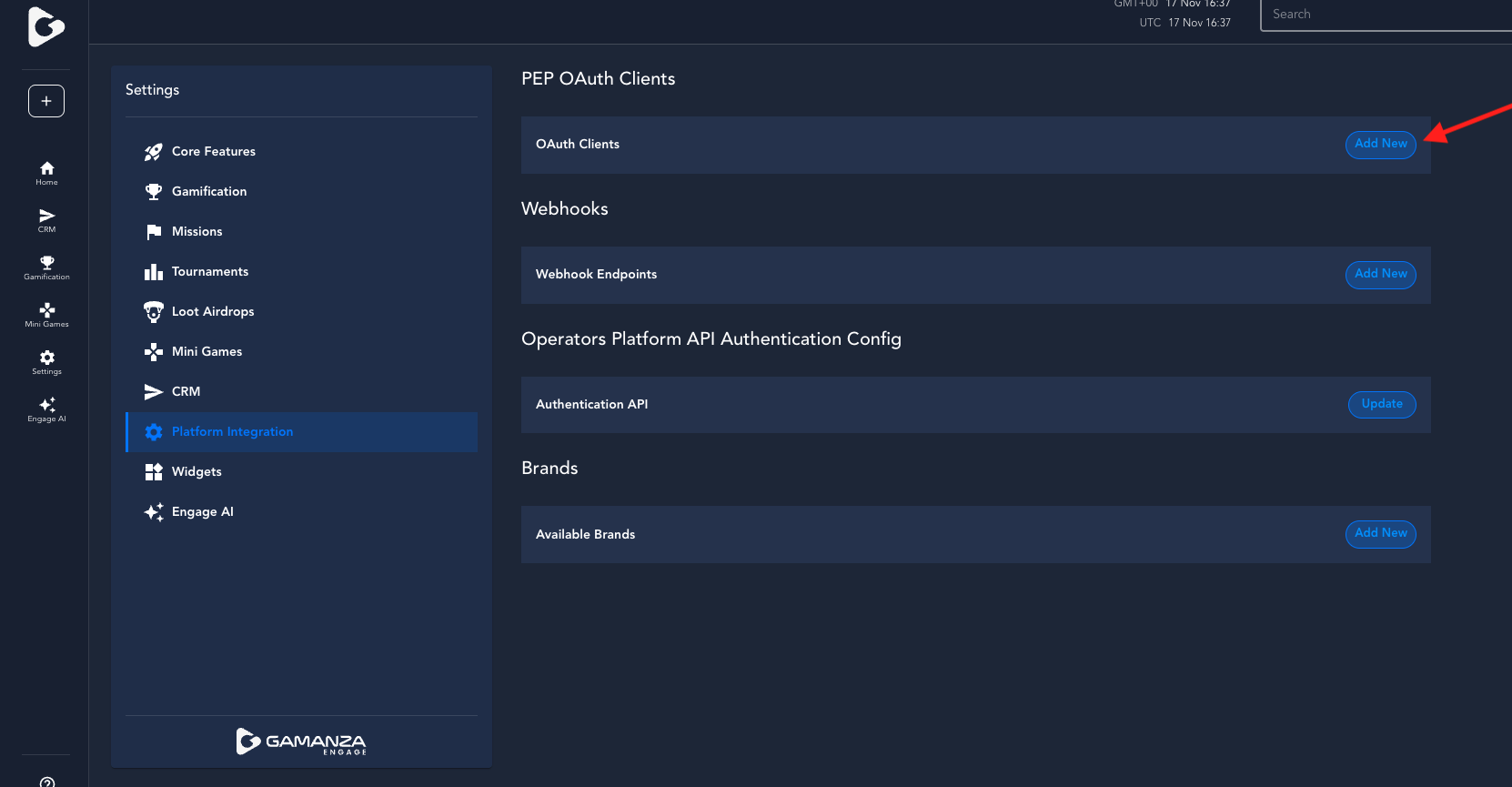
- Open the Admin Dashboard of your staging instance and go to Settings › Platform Integration.
- In the PEP OAuth Clients section, click Add New next to OAuth Clients.
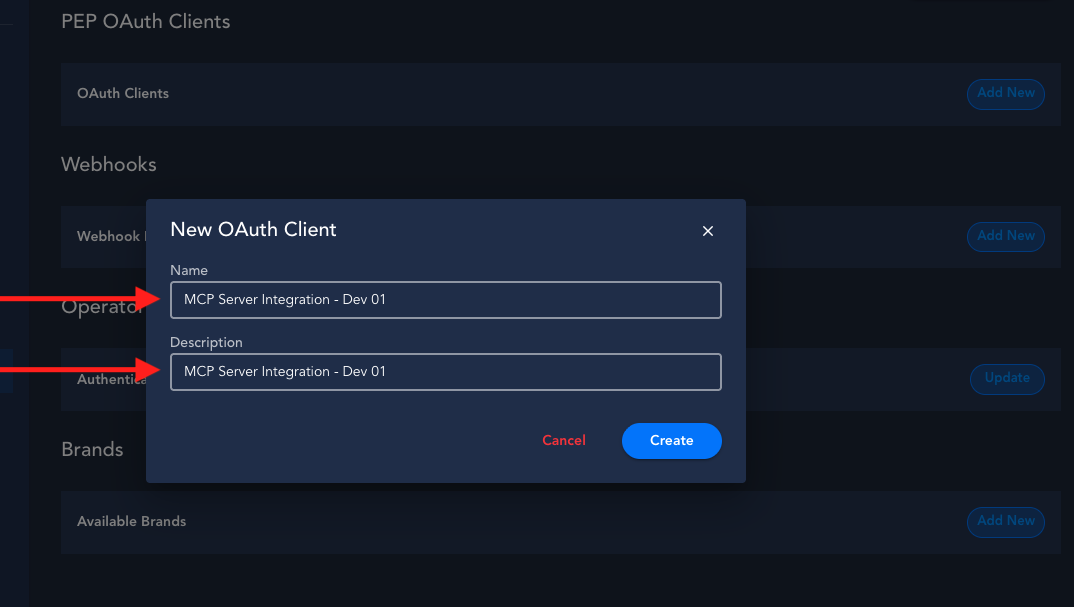
- Give the client a Name and a Description that say what it is for and who uses it, for example
MCP Server Integration - Dev 01. Then click Create.
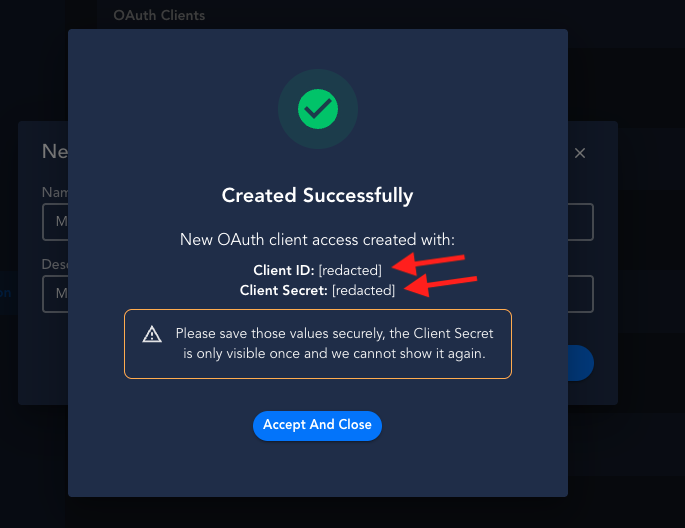
- Copy the Client ID and the Client Secret from the confirmation dialog and store them in a safe place, such as your password manager. The client secret is shown only once: if you lose it, create a new client.
A client per developer (… - Dev 01, … - Dev 02) gives each person their own quota and lets you revoke one person's
access without affecting the rest of the team.
Create a separate client only for the MCP server and do not reuse the one your PAMS uses. You can then revoke IDE access at any time by deleting that client in the same screen, without touching your integration. Never use production credentials: the MCP server only accepts staging clients.
Step 2: Find your MCP server URL
The MCP server lives on your staging Platform API host, under the path /mcp:
https://<your staging Platform API host>/mcp
For example, if your staging Platform API URL is https://platform-api-acme-sbx.gamanzaengage.com, your MCP server URL is:
https://platform-api-acme-sbx.gamanzaengage.com/mcp
If you are not sure which host is yours, ask your CSM.
Step 3: Keep the secret out of your repository
The configuration files below live in your project. To keep the client secret out of version control, export it as an environment variable and reference the variable from the configuration:
- macOS / Linux
- Windows (PowerShell)
# ~/.zshrc or ~/.bashrc
export ENGAGE_MCP_CLIENT_ID="your-client-id"
export ENGAGE_MCP_CLIENT_SECRET="your-client-secret"
[Environment]::SetEnvironmentVariable("ENGAGE_MCP_CLIENT_ID", "your-client-id", "User")
[Environment]::SetEnvironmentVariable("ENGAGE_MCP_CLIENT_SECRET", "your-client-secret", "User")
Restart your IDE after setting the variables so it picks them up. If you keep any file with the secret written in plain
text, add it to .gitignore.
Step 4: Connect your IDE
The server speaks Streamable HTTP. Every client needs the same three things: the URL, the x-client-id header and the
x-client-secret header. Pick your tool:
- Cursor
- Claude Code
- VS Code (Copilot)
- JetBrains
- Windsurf
- Claude Desktop
- Other clients
Create .cursor/mcp.json in your project (or ~/.cursor/mcp.json to use it in every project):
{
  "mcpServers": {
    "engage-staging": {
      "url": "https://platform-api-acme-sbx.gamanzaengage.com/mcp",
      "headers": {
        "x-client-id": "${env:ENGAGE_MCP_CLIENT_ID}",
        "x-client-secret": "${env:ENGAGE_MCP_CLIENT_SECRET}"
      }
    }
  }
}
Then open Cursor Settings › MCP (or Tools & Integrations). engage-staging appears with a green dot and seven
tools. If it shows an error, click the refresh icon after checking the URL and the variables.
Use the tools from the Agent chat. You can mention the server explicitly: "Use engage-staging to …".
Add the server with one command. Your shell expands the variables, so the values are stored in your local Claude Code configuration, private to you:
claude mcp add --transport http engage-staging \
  https://platform-api-acme-sbx.gamanzaengage.com/mcp \
  --header "x-client-id: ${ENGAGE_MCP_CLIENT_ID}" \
  --header "x-client-secret: ${ENGAGE_MCP_CLIENT_SECRET}"
To share the setup with your team, write .mcp.json in the project root instead. Claude Code expands ${VAR} from
each developer's environment when it starts, so the file can be committed without the secret:
{
  "mcpServers": {
    "engage-staging": {
      "type": "http",
      "url": "https://platform-api-acme-sbx.gamanzaengage.com/mcp",
      "headers": {
        "x-client-id": "${ENGAGE_MCP_CLIENT_ID}",
        "x-client-secret": "${ENGAGE_MCP_CLIENT_SECRET}"
      }
    }
  }
}
Check the connection:
claude mcp list
Inside a Claude Code session, /mcp shows the server status and its seven tools.
VS Code 1.102 and later support MCP servers in GitHub Copilot agent mode. Create .vscode/mcp.json. The inputs
block makes VS Code ask for the secret once and store it securely, so nothing sensitive lands in the file:
{
  "inputs": [
    {
      "type": "promptString",
      "id": "engage-client-secret",
      "description": "Gamanza Engage staging OAuth client secret",
      "password": true
    }
  ],
  "servers": {
    "engage-staging": {
      "type": "http",
      "url": "https://platform-api-acme-sbx.gamanzaengage.com/mcp",
      "headers": {
        "x-client-id": "your-client-id",
        "x-client-secret": "${input:engage-client-secret}"
      }
    }
  }
}
Click Start above the server entry in the file (or run MCP: List Servers from the Command Palette). Open Copilot
Chat, switch to Agent mode and check that the engage_* tools are enabled in the tools picker.
Works in IntelliJ IDEA, WebStorm, PyCharm, Rider, GoLand, PhpStorm and the other JetBrains IDEs.
AI Assistant
- Open Settings › Tools › AI Assistant › Model Context Protocol (MCP).
- Click Add, choose As JSON and paste:
{
  "mcpServers": {
    "engage-staging": {
      "url": "https://platform-api-acme-sbx.gamanzaengage.com/mcp",
      "headers": {
        "x-client-id": "your-client-id",
        "x-client-secret": "your-client-secret"
      }
    }
  }
}
- Click OK, then Apply. The server status turns green and lists seven tools.
- In the AI Assistant chat, use Agent (or Codebase) mode so the assistant can call tools.
Junie
Open Settings › Tools › Junie › MCP Settings, click Add, and paste the same JSON. Junie stores it in
~/.junie/mcp/mcp.json (all projects) or .junie/mcp/mcp.json (this project).
If your version only offers command-based (stdio) servers, use the bridge configuration below. It works in every JetBrains version that supports MCP.
Open Windsurf Settings › Cascade › MCP Servers › View raw config (file ~/.codeium/windsurf/mcp_config.json) and add:
{
  "mcpServers": {
    "engage-staging": {
      "serverUrl": "https://platform-api-acme-sbx.gamanzaengage.com/mcp",
      "headers": {
        "x-client-id": "your-client-id",
        "x-client-secret": "your-client-secret"
      }
    }
  }
}
Save, click Refresh in the MCP panel, and use the tools from Cascade.
Claude Desktop's configuration file starts local (stdio) servers, so use the mcp-remote bridge. Open
Settings › Developer › Edit Config and add:
{
  "mcpServers": {
    "engage-staging": {
      "command": "npx",
      "args": [
        "-y",
        "mcp-remote",
        "https://platform-api-acme-sbx.gamanzaengage.com/mcp",
        "--header",
        "x-client-id:${ENGAGE_MCP_CLIENT_ID}",
        "--header",
        "x-client-secret:${ENGAGE_MCP_CLIENT_SECRET}"
      ],
      "env": {
        "ENGAGE_MCP_CLIENT_ID": "your-client-id",
        "ENGAGE_MCP_CLIENT_SECRET": "your-client-secret"
      }
    }
  }
}
Restart Claude Desktop. The tools appear under the tools icon in the chat input.
Any client that supports remote MCP servers over Streamable HTTP works. Configure:
| Setting | Value |
|---|---|
| Transport | Streamable HTTP (sometimes labelled "HTTP" or "remote") |
| URL | https://<your staging Platform API host>/mcp |
| Header | x-client-id: <your client id> |
| Header | x-client-secret: <your client secret> |
Instead of the two client headers you can send an already minted staging access token as
Authorization: Bearer <token> (from POST /api/oauth/v1/token). When both are present, the client headers win.
The server is stateless: it does not use sessions, server-sent event streams or GET /mcp. Clients that require an SSE
endpoint can use the bridge below.
Bridge for stdio-only clients
Some clients can only start a local command. mcp-remote turns the remote
server into a local one. Use this block in any client that accepts the common mcpServers format:
{
  "mcpServers": {
    "engage-staging": {
      "command": "npx",
      "args": [
        "-y",
        "mcp-remote",
        "https://platform-api-acme-sbx.gamanzaengage.com/mcp",
        "--header",
        "x-client-id:${ENGAGE_MCP_CLIENT_ID}",
        "--header",
        "x-client-secret:${ENGAGE_MCP_CLIENT_SECRET}"
      ],
      "env": {
        "ENGAGE_MCP_CLIENT_ID": "your-client-id",
        "ENGAGE_MCP_CLIENT_SECRET": "your-client-secret"
      }
    }
  }
}
Write the headers as name:${VARIABLE} with no space after the colon. Some clients split arguments on spaces.
Step 5: Verify the connection
Ask your assistant:
Using the Gamanza Engage tools, which endpoints do I need for my Product Suite?
The assistant calls engage_scope_for_suite and lists the endpoints in order, starting with POST /api/oauth/v1/token
and POST /api/players-data/v1/players. If you see that list, you are connected.
You can also test from a terminal, without an IDE:
curl -sS https://platform-api-acme-sbx.gamanzaengage.com/mcp \
  -H 'content-type: application/json' \
  -H 'accept: application/json, text/event-stream' \
  -H "x-client-id: $ENGAGE_MCP_CLIENT_ID" \
  -H "x-client-secret: $ENGAGE_MCP_CLIENT_SECRET" \
  -d '{"jsonrpc":"2.0","id":1,"method":"tools/list"}'
A working setup returns a JSON-RPC result listing the seven tools. A wrong secret returns:
{ "error": "UNAUTHENTICATED", "message": "Invalid credentials" }
The tools
The server exposes seven tools. All names start with engage_ so they never clash with other MCP servers in your IDE.
You rarely call them by name; you ask a question and the assistant picks the tool. Every successful result contains
citations (where the answer comes from) and corpusVersion (which version of the knowledge answered).
| Tool | Journey stage | Use it to |
|---|---|---|
engage_scope_for_suite | Scope | List the endpoints your Product Suite needs, in dependency order. |
engage_search_docs | Discover | Search the published docs and knowledge base, with cited snippets. |
engage_get_endpoint_spec | Discover | Read one endpoint: fields, required flags, enums, units, formats, aliases, prerequisites. |
engage_map_event | Map | Map a PAMS event and its fields onto an Engage endpoint and its fields. |
engage_validate_payload | Validate | Check a synthetic payload locally or against your staging gateway, with a fix per field error. |
engage_get_sandbox_results | Verify | Read the requests your integration sent to staging, and why they failed. |
engage_escalate_to_human | Escalate | Send the question to the Gamanza Integrations Manager and your CSM. |
The responses below are real responses from a staging instance, shortened with … for readability. Identifiers
such as client ids and request ids are placeholders. Your corpusVersion and citations will differ.
engage_scope_for_suite
Returns the endpoints you must (or should) integrate for a Product Suite, in dependency order, with the reason for each
entry. Deprecated or unknown endpoints are never recommended; they are listed under excluded.
| Input | Type | Description |
|---|---|---|
suite | loyalty | missions | full-gamification | crm | combined | Optional. Defaults to the suite configured for your instance. |
include | required | all | Optional. required hides recommended and optional entries. Default all. |
Try asking
We bought the CRM suite. What is the minimum we have to integrate, and in which order?
Example response (suite: "crm", include: "required")
{
  "suite": "crm",
  "isTenantSuite": false,
  "entries": [
    { "order": 1, "endpoint": "POST /api/oauth/v1/token", "level": "required",
      "why": "Access token for every Platform API call.", "dependsOn": [], "direction": "pams-to-engage" },
    { "order": 2, "endpoint": "POST /api/players-data/v1/players", "level": "required",
      "why": "Player Information: register the player before CRM segmentation and campaigns.",
      "dependsOn": ["POST /api/oauth/v1/token"], "direction": "pams-to-engage" },
    { "order": 3, "endpoint": "PATCH /api/players-data/v1/players/{playerId}", "level": "required",
      "why": "Partial player update. Spec constraint: the player must already be registered.",
      "dependsOn": ["POST /api/players-data/v1/players"], "direction": "pams-to-engage" },
    { "order": 9, "endpoint": "POST /rx-api/players-data/v1/opt-in", "level": "required",
      "why": "Event when a player enables one or more channels for communication.",
      "dependsOn": ["POST /api/players-data/v1/players"], "direction": "pams-to-engage" },
    { "order": 12, "endpoint": "POST /rx-api/campaign/v1/trigger/send", "level": "required",
      "why": "Process trigger actions that dispatch CRM transactional campaigns.",
      "dependsOn": ["POST /api/players-data/v1/players"], "direction": "pams-to-engage" }
  ],
  "excluded": [],
  "citations": [
    { "kind": "sml", "title": "Trigger Events", "url": "https://docs.gamanzaengage.com/docs/CRM/trigger-events" },
    { "kind": "spec", "title": "Dynamic triggers API",
      "url": "https://docs.gamanzaengage.com/api-specs/platform-rx-api/crm/campaigns/dynamic.triggers.api.swagger.json" }
  ],
  "corpusVersion": "cae31158…"
}
isTenantSuitetells you whether this suite is the one configured for your instance.direction: "engage-to-pams"marks endpoints you implement and Gamanza calls, such asPOST /api/bonus/v1/assign-bonusorGET /api/games-catalog/v1/games-metadata/sync.
engage_search_docs
Searches the published Gamanza Engage documentation, API reference and knowledge base. Returns a few cited snippets, one per page first.
| Input | Type | Description |
|---|---|---|
query | string, 2–300 characters | What you are looking for. |
limit | 1–8 | Optional. Number of results. Default 5. |
kind | all | docs | api-docs | knowledge-base | Optional. Restrict the source. Default all. |
Try asking
How do I report a free-rounds bonus to Engage?
Example response (query: "bonus granted free rounds", limit: 3)
{
  "results": [
    {
      "title": "Bonus Granted",
      "url": "https://docs.gamanzaengage.com/docs-api/platform-rx-api/bonus/transactional-bonus-event-controller-process-bonus-granted",
      "headingPath": ["Bonus Granted"],
      "snippet": "# Bonus Granted POST /rx-api/transactions/v1/bonus-granted Report that a bonus has been credited to a player in your system. Each request reports a single bonus. … bonusType is CASH or FREE_ROUNDS. For CASH, bonusAmount is required and must be greater than zero. For FREE_ROUNDS, bonusAmount can be zero; describe the free rounds with freeSpinAmount, gameId and spinValue. …",
      "score": 490.45
    },
    {
      "title": "Reactive Manager API - Transactional Bonus Events",
      "url": "https://docs.gamanzaengage.com/docs-api/platform-rx-api/bonus/reactive-manager-api-transactional-bonus-events",
      "headingPath": ["Reactive Manager API - Transactional Bonus Events"],
      "snippet": "… If the bonus was awarded by PEP (for example as a mission, rank or CRM campaign reward), include engageOrigin and engageRewardRefId so PEP can link the event back to that…",
      "score": 201.65
    }
  ],
  "citations": [ … ],
  "corpusVersion": "cae31158…"
}
engage_get_endpoint_spec
Returns one endpoint in full: every request field with type, required flag, enum and description from the published spec, plus the semantics the spec cannot express (unit, format, aliases, common mistakes, what it must match), prerequisites, rules and deprecation status.
| Input | Type | Description |
|---|---|---|
endpoint | string | "METHOD /path" (for example "POST /rx-api/transactions/v1/game-transaction-round") or the path alone. |
Try asking
Show me every field of the casino game round event, with units and formats.
Example response (selected fields)
{
  "found": true,
  "endpoint": {
    "id": "POST /rx-api/transactions/v1/game-transaction-round",
    "direction": "pams-to-engage",
    "validatable": true,
    "cardinality": "One round per request: the gameTransactionRound array holds the BET and the WIN of the same round (1 or 2 items), never several rounds.",
    "prerequisites": [
      { "endpoint": "POST /api/players-data/v1/players", "reason": "The player must exist before any RX event." }
    ],
    "rules": [
      { "id": "bet-win-together", "text": "Send the BET and the WIN of a round together in one request when possible. If not, send the BET and later the WIN as separate requests, each with its own transactionId." },
      { "id": "approved-only", "text": "Only APPROVED transactions are processed for CRM and Gamification. REJECTED, PENDING and CANCELED are accepted and ignored." }
    ],
    "fields": [
      {
        "path": "gameTransactionRound[].realMoneyAmount",
        "type": "number",
        "required": true,
        "description": "The real money amount of transaction.",
        "semantics": {
          "unit": "major-units",
          "sign": "non-negative",
          "aliases": ["wager", "stake", "bet", "bet_amount", "real_amount", "amount", "win_amount", "payout"],
          "mistakes": ["Amount sent in minor units (cents). 125.00 EUR must be sent as 125, not 12500."]
        }
      },
      {
        "path": "gameTransactionRound[].date",
        "type": "string",
        "required": true,
        "description": "The date of transaction in RFC 3339 format, for example 2019-10-13T07:20:50.52Z",
        "semantics": {
          "format": "RFC 3339",
          "aliases": ["ts", "timestamp", "created_at", "event_time", "time"],
          "mistakes": ["Unix epoch number instead of an RFC 3339 string.", "Date-time without timezone offset."]
        }
      },
      {
        "path": "gameTransactionRound[].transactionType",
        "type": "string",
        "required": true,
        "enum": ["BET", "WIN"],
        "semantics": { "mistakes": ["Lower-case value (bet instead of BET)."] }
      }
    ],
    "deprecation": { "deprecated": false },
    "smlCoverage": "partial"
  }
}
If the endpoint does not exist, you get up to three suggestions instead:
{
  "found": false,
  "suggestions": [
    "POST /rx-api/transactions/v1/game-transaction-round",
    "POST /rx-api/transactions/v1/money-transaction",
    "POST /rx-api/transactions/v1/sport-transaction"
  ]
}
smlCoverage tells you how much of the endpoint has curated semantics: full, partial or none (spec only). The
mapping layer grows over time; spec facts (types, required, enums) are always present.
engage_map_event
Maps one of your PAMS events onto the Gamanza Engage endpoint and fields. You describe the event in plain words and list your field names, optionally with sample values. Sample values are only used to detect common mistakes (epoch dates, lower-case codes, cents) and are never stored.
| Input | Type | Description |
|---|---|---|
description | string, 3–2000 characters | What the event is, in your words. |
sourceFields | object (max 100 keys) | Your field names, each with a sample value or null. |
targetEndpoint | string | Optional. Force the target endpoint instead of letting the tool choose. |
Try asking
Our PAMS sends this when a player places a slot bet:
{ "player": "abc", "stake": 500, "cur": "eur", "game": "slots_x", "time": 1699999999, "round_id": "r-1" }. Map it to Engage.
Example response
{
  "status": "partial",
  "endpoint": "POST /rx-api/transactions/v1/game-transaction-round",
  "event": "casino.round",
  "mappings": [
    { "sourceField": "player", "targetField": "gameTransactionRound[].playerId", "match": "alias",
      "notes": ["Stable operator player id, never email or username."], "warnings": [] },
    { "sourceField": "stake", "targetField": "gameTransactionRound[].realMoneyAmount", "match": "alias",
      "notes": ["unit: major-units", "sign: non-negative"], "warnings": [] },
    { "sourceField": "cur", "targetField": "gameTransactionRound[].currency", "match": "alias",
      "notes": ["format: ISO-4217", "Upper-case alpha-3 code of the player's wallet currency; must match the currency sent on player create."],
      "warnings": ["Lower-case currency code (eur instead of EUR)."] },
    { "sourceField": "game", "targetField": "gameTransactionRound[].gameId", "match": "alias",
      "notes": ["must match: GET /api/games-catalog/v1/games-metadata/sync#data[].id"], "warnings": [] },
    { "sourceField": "time", "targetField": "gameTransactionRound[].date", "match": "alias",
      "notes": ["format: RFC 3339"], "warnings": ["Unix epoch number instead of an RFC 3339 string."] },
    { "sourceField": "round_id", "targetField": "gameTransactionRound[].gameSessionId", "match": "alias",
      "notes": ["Game session id. Do not confuse with the round id when the PAMS has both."], "warnings": [] }
  ],
  "unmappedSourceFields": [],
  "missingRequiredFields": [
    "gameTransactionRound[].bonusMoneyAmount",
    "gameTransactionRound[].exchangeRate",
    "gameTransactionRound[].gameName",
    "gameTransactionRound[].transactionId",
    "gameTransactionRound[].transactionStatus",
    "gameTransactionRound[].transactionType",
    "…"
  ],
  "prerequisites": [
    { "endpoint": "POST /api/players-data/v1/players", "reason": "The player must exist before any RX event." }
  ],
  "message": "Some required fields have no grounded source mapping."
}
How to read it:
status:mapped(all required fields covered),partial(some required fields have no source field yet) orno_grounded_mapping(see below).match:exact(same name),alias(a known PAMS name for this field) ornormalized(same name after removing prefixes such asplayer_or suffixes such as_idor_cents).warnings: problems found in your sample values. Here: the currency must be upper case and the date must be an RFC 3339 string, not an epoch number.missingRequiredFields: what your event still has to provide before the request can pass.
When there is no grounded answer, the tool says so instead of guessing, and offers candidates you can ask about:
{
  "status": "no_grounded_mapping",
  "candidates": [
    "POST /api/players-data/v1/players",
    "POST /rx-api/transactions/v1/game-transaction-round",
    "POST /rx-api/transactions/v1/money-transaction"
  ],
  "mappings": [],
  "unmappedSourceFields": ["avatar_url"],
  "message": "No grounded mapping: the description and source fields did not match a semantic mapping strongly enough."
}
If you already know the endpoint, pass it as targetEndpoint ("map these fields to the money transaction endpoint").
engage_validate_payload
Validates a synthetic sample payload. It runs local pre-checks first and then, unless you ask for a dry run, sends the payload to your staging Platform API Gateway with your own token and explains every field error the gateway returns.
| Input | Type | Description |
|---|---|---|
endpoint | string | The target endpoint, for example "POST /rx-api/transactions/v1/game-transaction-round". |
payload | object or array | The request body, as JSON. Synthetic test data only. Max 256 KB. |
pathParams | object | Values for path parameters, for example { "playerId": "test-player-001" } for PATCH /api/players-data/v1/players/{playerId}. |
dryRun | boolean | Optional. true runs local pre-checks only and does not call staging. |
Possible status values
| Status | Meaning |
|---|---|
precheck_passed | Dry run: no local problems found. Staging was not called. |
precheck_failed | Local problems found. Staging was not called (dry run, or a body with the wrong root shape). |
accepted | The staging gateway answered 2xx. This is gateway-level acceptance; see Accepted is not processed. |
rejected | The gateway answered 4xx. fieldErrors explains each problem. |
not_validatable | The endpoint cannot be sent to the gateway, for example one you implement (engage-to-pams). |
upstream_error | The gateway was unreachable, timed out or answered 5xx. |
Try asking
Validate this round against staging:
{ "gameTransactionRound": [{ "playerId": "test-player-001", "date": 1699999999, "currency": "eur", "transactionType": "bet", … }] }
Example: dry run (dryRun: true)
{
  "status": "precheck_failed",
  "endpoint": "POST /rx-api/transactions/v1/game-transaction-round",
  "preChecks": [
    { "field": "gameTransactionRound.0.currency", "kind": "lowercase-enum",
      "message": "Lower-case currency code (eur instead of EUR)." },
    { "field": "gameTransactionRound.0.date", "kind": "epoch-timestamp",
      "message": "Unix epoch number instead of an RFC 3339 string." },
    { "field": "gameTransactionRound.0.transactionType", "kind": "lowercase-enum",
      "message": "Lower-case value (bet instead of BET)." }
  ],
  "fieldErrors": [],
  "prerequisitesReminder": ["POST /api/players-data/v1/players — The player must exist before any RX event."],
  "message": "Local pre-checks found problems. The staging gateway was not called."
}
Example: rejected by staging (same payload, no dry run)
{
  "status": "rejected",
  "httpStatus": 400,
  "requestId": "7f24ae1f-0000-0000-0000-000000000000",
  "fieldErrors": [
    {
      "field": "0.date",
      "specField": "gameTransactionRound[].date",
      "error": "date must be a valid ISO 8601 date string",
      "hints": [
        "date format is RFC 3339",
        "Unix epoch number instead of an RFC 3339 string.",
        "All dates are RFC 3339 strings with a timezone offset, for example 2019-10-13T07:20:50.52Z. Unix epoch numbers and local times without offset are rejected or misinterpreted."
      ]
    },
    {
      "field": "0.currency",
      "specField": "gameTransactionRound[].currency",
      "error": "currency must be one of the following values: AFN, EUR, ALL, DZD, USD, …",
      "hints": [
        "Lower-case currency code (eur instead of EUR).",
        "Upper-case alpha-3 code of the player's wallet currency; must match the currency sent on player create."
      ]
    },
    {
      "field": "0.transactionType",
      "specField": "gameTransactionRound[].transactionType",
      "error": "transactionType must be one of the following values: BET, WIN",
      "hints": ["Lower-case value (bet instead of BET).", "Allowed values: BET, WIN"]
    }
  ],
  "message": "The staging gateway rejected the payload (HTTP 400)."
}
fieldis the path exactly as the gateway reports it. Inside arrays it can be relative to the item (0.datemeansgameTransactionRound[0].date).specFieldis the same field in spec notation, so it matchesengage_get_endpoint_spec.requestIdidentifies the call in your staging HTTP Debugger. Pass it toengage_get_sandbox_resultsto see the full request and response.
Example: accepted (after fixing the three fields and adding the WIN of the round)
{
  "status": "accepted",
  "httpStatus": 202,
  "requestId": "5afc6be0-0000-0000-0000-000000000000",
  "fieldErrors": [],
  "preChecks": [],
  "message": "The staging gateway accepted the payload (HTTP 202). This is gateway-level acceptance only and does not confirm downstream processing. engage_get_sandbox_results shows the HTTP Debugger record of the gateway response, not later processing."
}
Example: unknown arguments are rejected. The tools never accept a target URL, tenant or environment from the caller, so a prompt cannot redirect them:
{ "error": "INVALID_INPUT", "message": "url is not an accepted field" }
Never paste real player data (names, emails, phone numbers, real player ids) into a payload. Use clearly fake values such
as test-player-001. The payload is sent to your staging gateway and stored in your staging HTTP Debugger for up to 7 days.
engage_get_sandbox_results
Reads the requests that reached your staging Platform API Gateway, as recorded by the HTTP Debugger. This is the real feedback loop: your integration code sends events to staging exactly as it will in production, and you ask the assistant what happened. No copy and paste.
| Input | Type | Description |
|---|---|---|
view | list | detail | summary | Optional. Default list. |
since / until | ISO 8601 date-time with offset | Optional time window. until pages back through older rows. |
endpoint | string | Optional. Only requests to this endpoint. |
clientId | string | Optional. Only requests from this OAuth client (for example your PAMS client). |
status | all | errors | Optional. errors keeps HTTP status 400 and above. Default all. |
limit | 1–50 | Optional. Rows for list. Default 20. |
requestId | string | Required for view: "detail". |
All OAuth clients of your staging instance are visible, so the assistant can read what your PAMS sent even though the IDE uses a different client.
Try asking
Why did my last requests fail on staging?
Example: list (status: "errors", limit: 3)
{
  "available": true,
  "view": "list",
  "items": [
    {
      "timestamp": "2026-11-17T16:31:49.018Z",
      "requestId": "7f24ae1f-0000-0000-0000-000000000000",
      "clientId": "your-pams-client-id",
      "method": "POST",
      "path": "/rx-api/transactions/v1/game-transaction-round",
      "endpoint": "POST /rx-api/transactions/v1/game-transaction-round",
      "statusCode": 400,
      "success": false,
      "durationMs": 6,
      "fieldErrors": [
        { "field": "0.date", "specField": "gameTransactionRound[].date",
          "error": "date must be a valid ISO 8601 date string",
          "hints": ["date format is RFC 3339", "Unix epoch number instead of an RFC 3339 string."] },
        { "field": "0.transactionType", "specField": "gameTransactionRound[].transactionType",
          "error": "transactionType must be one of the following values: BET, WIN",
          "hints": ["Lower-case value (bet instead of BET).", "Allowed values: BET, WIN"] }
      ]
    },
    {
      "timestamp": "2026-11-17T16:27:02.183Z",
      "method": "GET",
      "path": "/",
      "endpoint": null,
      "statusCode": 401,
      "fieldErrors": [],
      "note": "The path matches no documented Engage endpoint (unknown route, scanner or internal call)."
    }
  ],
  "message": "Newest 3 matching requests; the feed keeps 7 days. For older ones, call again with until set to 2026-11-17T16:16:40.806Z."
}
Example: detail (view: "detail", requestId from the list) returns the stored request body, the allowed headers
and the gateway response:
{
  "view": "detail",
  "detail": {
    "requestId": "7f24ae1f-0000-0000-0000-000000000000",
    "statusCode": 400,
    "headers": { "content-type": "application/json", "content-length": "492" },
    "body": {
      "gameTransactionRound": [
        { "playerId": "test-player-001", "date": 1699999999, "currency": "eur", "transactionType": "bet", "…": "…" }
      ]
    },
    "responseData": {
      "message": "Bad Request Exception",
      "request": { "xRequestId": "7f24ae1f-…", "method": "POST", "uri": "/rx-api/transactions/v1/game-transaction-round" },
      "details": { "faultCode": 400, "fields": [ { "field": "0.date", "error": "date must be a valid ISO 8601 date string" }, "…" ] }
    },
    "fieldErrors": [ "… same as in the list, with hints …" ]
  }
}
Example: summary (view: "summary", last 24 hours by default) counts requests per endpoint and status, and the most
frequent field errors:
{
  "view": "summary",
  "summary": {
    "since": "2026-11-16T16:31:55.412Z",
    "endpoints": [
      { "endpoint": "POST /api/oauth/v1/token", "count": 141 },
      { "endpoint": "POST /api/players-data/v1/players", "count": 49 },
      { "endpoint": "POST /rx-api/players-data/v1/login", "count": 45 },
      { "endpoint": "POST /rx-api/transactions/v1/game-transaction-round", "count": 15 }
    ],
    "statusCodes": [
      { "statusCode": 201, "count": 141 },
      { "statusCode": 202, "count": 88 },
      { "statusCode": 400, "count": 7 }
    ],
    "fieldErrors": [
      { "field": "0.date", "specField": "gameTransactionRound[].date",
        "error": "date must be a valid ISO 8601 date string", "count": 1,
        "hints": ["Unix epoch number instead of an RFC 3339 string.", "…"],
        "exampleRequestId": "7f24ae1f-…" }
    ]
  }
}
Credentials are never shown: authorization headers, tokens and secrets are removed before a request is stored, and the token endpoint's response is not stored at all.
Accepted is not processed
A 202 Accepted means the request passed gateway validation and was queued. Processing happens afterwards, and it
can still fail: for example, an event for a player that was never created is accepted by the gateway and then ignored.
The sandbox results show gateway-level outcomes only. Always create the player with POST /api/players-data/v1/players
before you send events for that player.
engage_escalate_to_human
Hands the question to the Gamanza Integrations Manager and your CSM when the tools cannot answer it. Use it for open questions about semantics, unexpected behaviour or anything that needs a decision on our side.
| Input | Type | Description |
|---|---|---|
topic | mapping | validation | auth | scope | sandbox | other | What the question is about. |
summary | string, 10–2000 characters | What you need, what you tried, error messages. Shared with our team in full. |
endpoint | string | Optional. The endpoint the question is about. |
Try asking
Escalate this to Gamanza: on game-transaction-round, is betAmount an integer in minor units or a major-units amount like realMoneyAmount?
Example response
{
  "escalationId": "esc_3a9f0c1d2e4b5a67",
  "status": "recorded",
  "nextSteps": "The Gamanza Integrations Manager and CSM will review this escalation. You can keep using engage_search_docs and engage_get_endpoint_spec for published behaviour while you wait."
}
Keep the escalationId and mention it when you follow up with your CSM. Do not put secrets or real personal data in the
summary.
Walkthrough: from credentials to your first passing event
This is a complete session for an operator on the Loyalty suite that wants to send casino rounds. Each step shows what you type and what the assistant does.
1. Scope. "We are on Loyalty. What do we need to integrate first?"
The assistant calls engage_scope_for_suite and answers: get a token with POST /api/oauth/v1/token, create players
with POST /api/players-data/v1/players, then send player events and transactions such as
POST /rx-api/transactions/v1/game-transaction-round. It also points out that you must implement
GET /api/games-catalog/v1/games-metadata/sync, because gameId on casino rounds must match your games catalog to earn
Loyalty points.
2. Map. "Our wager message looks like this: { "player": "abc", "stake": 500, "cur": "eur", "game": "slots_x", "time": 1699999999 }. Map it."
The assistant calls engage_map_event. It maps player → playerId, stake → realMoneyAmount (major units: 500 means
500.00, not 5.00), cur → currency (must be EUR, upper case), game → gameId (must match your games catalog) and
time → date (convert the epoch to RFC 3339). It lists the required fields your message does not have yet, such as
transactionId, transactionType, transactionStatus, exchangeRate and the balances.
3. Generate the mapper. "Write a TypeScript function that turns our wager and win messages into a game-transaction-round request."
The assistant writes the code in your project using the mapping above. For example:
interface PamsWager {
  player: string;
  stake: number; // already in major units, e.g. 2.5 = 2.50 EUR
  cur: string;
  game: string;
  time: number; // epoch seconds
  roundId: string;
  balance: number;
}

export function toGameTransactionRound(bet: PamsWager, win?: { amount: number; balance: number; time: number }) {
  const base = {
    playerId: bet.player,
    currency: bet.cur.toUpperCase(),
    exchangeRate: 1,
    gameId: bet.game,
    gameName: bet.game,
    gameProviderId: 'your-provider-id',
    gameProviderName: 'Your Provider',
    gameCategoryId: 'slots',
    gameCategoryName: 'Slots',
    gameSessionId: bet.roundId,
    bonusMoneyAmount: 0,
    bonusMoneyBalance: 0,
    transactionStatus: 'APPROVED',
  };
  const items: Array<Record<string, string | number>> = [
    {
      ...base,
      transactionType: 'BET',
      transactionId: `${bet.roundId}-bet`,
      realMoneyAmount: bet.stake,
      realMoneyBalance: bet.balance,
      date: new Date(bet.time * 1000).toISOString(),
    },
  ];
  if (win) {
    items.push({
      ...base,
      transactionType: 'WIN',
      transactionId: `${bet.roundId}-win`,
      realMoneyAmount: win.amount,
      realMoneyBalance: win.balance,
      date: new Date(win.time * 1000).toISOString(),
      betAmount: bet.stake,
    });
  }
  return { gameTransactionRound: items };
}
4. Validate. "Run the mapper on a test wager and validate the result against staging."
The assistant builds a synthetic payload, calls engage_validate_payload and gets accepted (HTTP 202). If a field were
wrong, it would read the fieldErrors and hints, fix the mapper and validate again.
5. Run your real code. Point your integration at staging and send a few rounds. Then ask: "Did my last game rounds pass on staging?"
The assistant calls engage_get_sandbox_results with endpoint set to the game round and status: "errors". If your
code sent an epoch date somewhere, it shows you which request, which field and the fix, from the request your code
actually sent.
6. Escalate what is still open. "Escalate: do we need to send a WIN with realMoneyAmount 0 for a losing round?" The assistant records an escalation for the Integrations Manager and your CSM and gives you the escalation id.
Prompt cookbook
Copy these into your assistant's chat. They work in any IDE.
Scope and planning
- Which endpoints do we need for the Full Gamification suite? Group them by required, recommended and optional.
- Which of those endpoints do we have to implement on our side, so that Engage can call us?
- Create a checklist in
docs/engage-integration.mdwith the required Loyalty endpoints in dependency order.
Understanding endpoints
- Explain every required field of
POST /rx-api/transactions/v1/money-transaction, with units and formats. - What is the difference between account-verified and kyc-verified?
- Is
POST /rx-api/players-data/v1/self-assessmentdeprecated? - Search the docs: how should we handle the exchangeRate when the player currency equals the base currency?
Mapping
- Here is our deposit webhook payload (attached). Map it to Engage and list what is missing.
- Our player object uses
dob,msisdnandcountry_code. Which Engage fields are they, and which formats are expected? - Map these fields to
POST /api/players-data/v1/players: customer_id, email_address, first_name, last_name, sex, lang.
Validation
- Dry-run this payload without calling staging.
- Validate this player create request against staging and fix whatever fails.
- Write a unit test that builds our game round payload and validate the same payload against staging.
Debugging with sandbox results
- Show a summary of our staging traffic in the last 24 hours. Which errors are the most frequent?
- Show me the full request and response for request id
7f24ae1f-…. - List only the failed requests from client
<our PAMS client id>since this morning.
Getting help
- Escalate to Gamanza: we receive 202 for bonus-granted but the bonus never shows in the player profile.
- Say which Product Suite you are on.
- Paste the shape of your PAMS message with fake values, not a real message.
- Ask the assistant to validate against staging before you accept generated code.
- Ask for the citations when you want to double-check a claim.
Limits and quotas
The tools are answer-shaped: they return focused answers, not data dumps. These defaults apply per OAuth client:
| Limit | Default | What happens |
|---|---|---|
| Tool calls per minute | 60 | HTTP 429 QUOTA_EXCEEDED until the minute window moves on. |
| Tool calls per day | 2,000 | HTTP 429 QUOTA_EXCEEDED until the day window moves on. |
| Distinct endpoints inspected in 10 minutes (spec, map, validate) | 25 | HTTP 429 ANOMALY_THROTTLED. Scoping a suite does not count. |
Payload size for engage_validate_payload | 256 KB | INVALID_INPUT |
| Search results per call | 8 | Extra results are cut. |
| Sandbox rows per call | 50 | Page back with until. |
| Sandbox retention | 7 days | Older requests are no longer available. |
| Escalation summary | 10 to 2,000 characters | INVALID_INPUT with the exact length. |
initialize, tools/list and other protocol messages do not count towards the quotas. Your CSM can tell you whether
your instance uses different values.
Errors and troubleshooting
Connection errors
These are returned as HTTP errors before any tool runs. Your IDE usually shows them as "failed to connect".
| HTTP status | Error | What it means | What to do |
|---|---|---|---|
| 401 | UNAUTHENTICATED: Missing credentials | Only one of the two client headers was sent, or none. | Send both x-client-id and x-client-secret, or a Bearer token. Check that your environment variables are set in the IDE's environment. |
| 401 | UNAUTHENTICATED: Invalid credentials | The client does not exist on this staging instance, is disabled, or the secret is wrong. | Create a new client in the Admin Dashboard of this staging instance. Clients from another instance or from production do not work. |
| 403 | FORBIDDEN_TENANT | The request reached the server through a host that is not your instance's host. | Use the URL from Step 2. |
| 405 | INVALID_INPUT: Method not allowed | The client opened GET /mcp (an SSE stream). | The server is stateless and only accepts POST. Use a Streamable HTTP client or the bridge. |
| 429 | QUOTA_EXCEEDED / ANOMALY_THROTTLED | A limit from Limits and quotas was reached. | Wait for the window to move on. |
| 502 | UPSTREAM_UNAVAILABLE | The authorization service could not be reached. | Retry in a minute. If it persists, contact your CSM. |
| 503 | CORPUS_UNAVAILABLE | The server is starting and has not loaded its knowledge yet. | Retry in a minute. |
Tool errors
When a tool call itself fails, the result is marked as an error and carries a JSON message such as
{"error":"INVALID_INPUT","message":"requestId is required when view is detail"}. Your assistant reads it and usually
corrects the call by itself. Common ones:
| Error | Typical cause |
|---|---|
INVALID_INPUT | A required argument is missing, a value is out of range, or an argument is not accepted (for example url). |
INVALID_INPUT: Missing path parameter "playerId". | engage_validate_payload on a path with {playerId} without pathParams. |
NOT_FOUND: Unknown tool | The client called a tool name that does not exist. Reload the server in your IDE. |
Common problems
The server shows as connected but the assistant never uses the tools
- Use the chat mode that can call tools: Agent in Cursor, VS Code Copilot and JetBrains AI Assistant; any mode in Claude Code.
- Check that the
engage_*tools are enabled in the tools picker (VS Code and Cursor let you disable individual tools). - Mention the server in your prompt: "Using the Gamanza Engage tools, …".
The environment variables are not picked up
IDEs started from the dock or start menu do not always see variables from your shell profile. Start the IDE from a
terminal (cursor ., code ., idea .), or set the variables at user level (Windows) or with launchctl setenv
(macOS), then restart the IDE.
engage_validate_payload returns not_validatable
The endpoint is one you implement and Gamanza calls (Operators API, for example POST /api/bonus/v1/assign-bonus),
or a read-only Data Fetch endpoint. Those cannot be sent to your staging gateway. Use engage_get_endpoint_spec to see
what Engage will send to you and what it expects in return.
engage_get_sandbox_results says the feed is not available
The HTTP Debugger feed is not enabled for your staging instance yet. Contact your CSM. All other tools keep working.
A JetBrains client sends the payload as a string
That is supported. When payload arrives as a JSON string that contains an object or an array, the server parses it.
Any other string is rejected with a clear message.
Security and data governance
The MCP server works at the schema and contract level. Your assistant sees field structures, our documentation and your staging test data, never production player data.
- Staging only. The server runs on staging instances only and refuses to start as production. It only calls your staging Platform API Gateway, never a URL, tenant or environment supplied by a prompt.
- Your own credentials. Calls to the gateway use the token of your OAuth client, so the usual platform rate limits, audit and client isolation apply.
- Nothing to install. The server is hosted by Gamanza. There is no package to download and nothing that can go out of date in your environment.
- What is stored. For every tool call the server keeps a signed audit record (client id, tool name, a hash of the arguments, outcome) and usage telemetry (field names and outcomes, never values). Tool arguments themselves are not stored. Escalations are stored in full and shared with the Integrations Manager and your CSM.
- What the IDE's model sees. The tool descriptions and tool results. Your IDE's AI provider processes them under your agreement with that provider. That is why every payload must be synthetic.
- Revoking access. Delete the dedicated OAuth client in Settings › Platform Integration › PEP OAuth Clients. Every IDE using it loses access immediately (cached tokens expire with the token).
- Use a dedicated staging client for the MCP server, and rotate or delete it when a developer leaves the project.
- Keep the client secret out of version control (see Step 3).
- Use synthetic data only, in payloads, in source field samples and in escalation summaries.
FAQ
Does the MCP server write code for me?
No. Your IDE's assistant writes the code. The MCP server gives it grounded facts (fields, units, formats, rules) and a way to check the result against staging, so the generated code is correct the first time far more often.
Which AI model do I need?
Any model your IDE offers that supports tool calling. The MCP server does not depend on a specific model or vendor.
How up to date is the information?
The server rebuilds its knowledge from the published documentation on a schedule (every few hours) and when the
documentation is redeployed. Every answer carries corpusVersion, so you can tell which version answered.
What if an answer looks wrong?
Check the citations in the result: they point to the spec or docs page the answer comes from. If the published
documentation itself is unclear or wrong, use engage_escalate_to_human so our team can correct it for everyone.
Can several developers share one OAuth client?
Yes, but quotas are counted per client, and revoking the client removes access for everyone. One client per developer or per team makes access easier to manage.
Can I use it against production?
No. The MCP server exists only on staging instances. Your integration code uses its own credentials against production once you go live; the MCP server is not involved.