Rich Inbox Notifications
Rich inbox Notifications
The Rich Inbox channel allows players to receive CRM messages in two UI surfaces:
- A compact inbox which opens from a notification icon.
- A full inbox page with search, filters, and message preview.
The message content is managed entirely in the CRM. The frontend integration is responsible for rendering widgets and exposing the required containers.
Features
The Rich Inbox implementation has SDK capabilities and frontend behavior:
- Widgets include rich inbox analytics events for open, search, message open, bulk actions, mark-all-as-read, preview close, selection, and infinite-scroll loads.
- Notification Icon and Page widgets synchronize actions and state updates in real time through a shared internal sync event.
- Notification Icon widget supports locale-based navigation to an external full Rich Inbox page
- Rich Inbox snackbar notifications support dedicated payload fields (
snackbarIcon,snackbarText,snackbarButtonText) and route users into message preview flows.
Available widgets
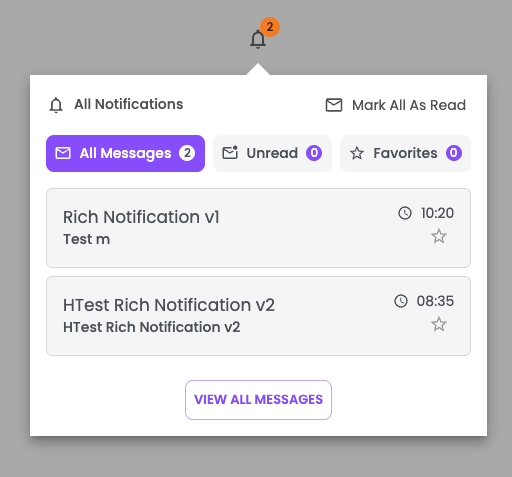
1) Notification Icon widget
Shows a notification badge and opens a popover with:
- All/Unread/Favorites filters
- Message list
- Bulk actions (read/unread/favorite)
- "Mark all as read"
Configuration:
- class
<string|required>: gamification_widget - data-type
<string|required>: rich-inbox-icon
Example:
<div class="gamification_widget" data-type="rich-inbox-icon"></div>
Example UI:
2) All messages page widget
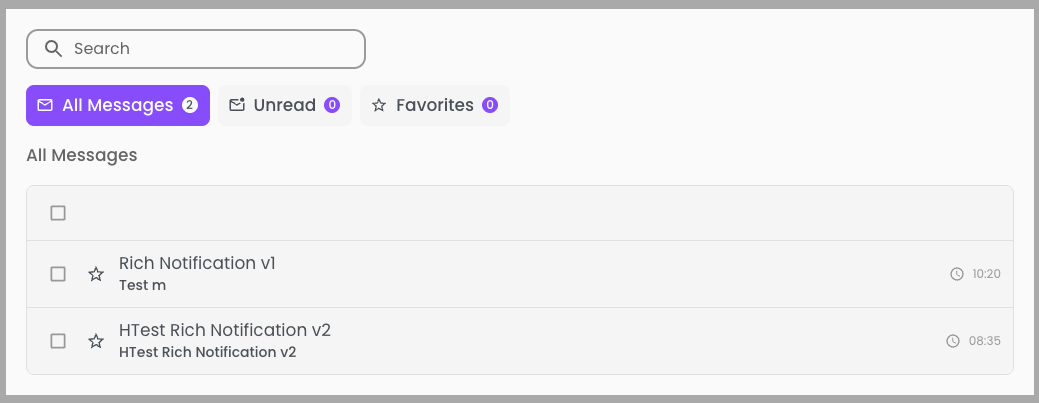
Shows the full Rich Inbox experience:
- Search by title/content
- All/Unread/Favorites tabs
- Infinite pagination
- Message detail preview
- Single and bulk actions
Configuration:
- class
<string|required>: gamification_widget - data-type
<string|required>: rich-inbox-page
Example:
<div class="gamification_widget" data-type="rich-inbox-page"></div>
Example UI:
Feature screenshots
Snackbar

Filters and counters

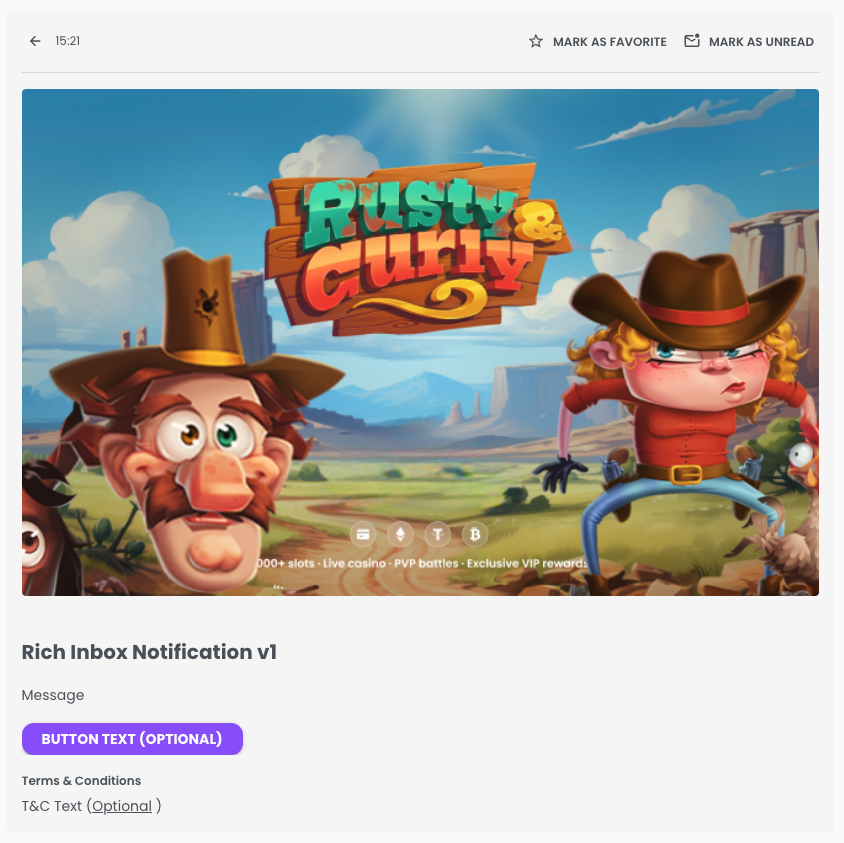
Message preview
Runtime behavior
Real-time updates
When a CRM rich inbox notification arrives through socket events, widgets refresh automatically and stay synchronized.
Cross-widget synchronization
The notification icon and page widgets share state updates for read/favorite changes and refreshes. This keeps counts, filters, and message status aligned even when actions are performed from different widgets.
Message actions
Rich Inbox supports:
- Mark as read / unread
- Mark all as read
- Add/remove favorite
- Bulk read/unread/favorite actions
These actions are persisted through CRM APIs and reflected across both widgets.
Deep-link preview flow
Rich Inbox supports opening a specific message preview from URL hash state. The header can pass message context to the page flow so the selected message opens directly after navigation.
Filters and counts
Widgets include:
allunreadfavorites
Counts are refreshed in real time so the header badge and lists remain consistent.
Mark-all-as-read behavior
Mark all as read is performed against unread messages in batches, ensuring large inboxes are processed safely without requiring full reload loops in the host app.
Analytics events
Rich Inbox widgets emit dedicated analytics events, including:
- open rich inbox
- open message preview
- mark as read / unread
- mark as favorite / remove favorite
- mark all as read
- search input usage
- select/unselect messages (single and all visible)
- preview close
- load more by scroll
Each event includes widget_location to differentiate header vs page context.
Integration guide
Use this checklist to integrate Rich Inbox end-to-end in your frontend:
1) Render widget containers
Place both widgets where you want them rendered:
<!-- Header trigger -->
<div class="gamification_widget" data-type="rich-inbox-icon"></div>

<!-- Full page -->
<div class="gamification_widget" data-type="rich-inbox-page"></div>
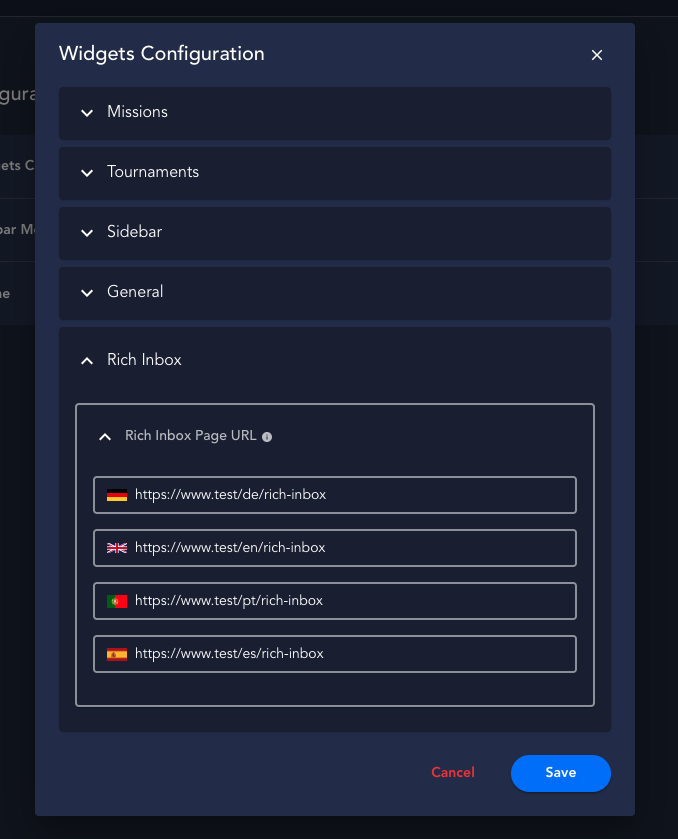
2) Configure page URL mapping by locale
To allow header flows to redirect users to the full page experience, configure rich_inbox_page_url in Admin Settings with locale keys and an EN fallback.
Configuration preview
3) Support host routing for "View all messages"
If your app uses custom routing, implement host-side navigation to your Rich Inbox page route. The widget CTA is visual-only unless the host provides the route handling.
4) Enable deep-link preview from header to page
When users open a message from the header, the flow can pass the selected message through URL hash and open the message preview directly in page mode.
Current hash prefix used by the widget flow:
#RID_<messageId>
5) Validate runtime dependencies
Before going live, verify:
- CRM Rich Inbox channel is enabled and sending messages for the player.
- Widget initialization is completed and socket subscriptions are active.
- Message
displayTypeisSNACKBAR_ON_SCREENwhen snackbar UI is expected. - Page URL config includes player locales used in production.
Translations
Rich Inbox introduces channel-specific translation keys, including labels for:
- All notifications/messages
- Favorites
- Unread
- Search
- Mark as read/unread
- Mark all as read
- Add/remove favorites
- Select all messages
- Selected
- No messages found for search
- End-of-list message
- View all / View all messages
- Terms & Conditions
Use the standard translations config in widgets initialization to override these texts by locale.